Hosted Forms · Pages · AI Chat

Forms, Pages & AI Chat in minutes.

Formsig is hosted form infrastructure: secure form endpoints for any website or app, optional Hosted Pages you publish as a shareable link, AI Chat (Beta) for an embeddable site assistant, and one shared submissions inbox with email alerts, CSV export, and webhooks. No backend required.

Wire a form POST URL, publish a Hosted Page, or paste one script for plug-and-play AI Chat, a site assistant that answers from your crawled pages. Same dashboard, no backend to run.

No credit card required · Free plan available · Publish in minutes

AI Chat · Features · Pricing · AI Chat guide

Three ways to help visitors: form POST URL, Hosted Page, or plug-and-play AI Chat. Submissions and chat leads land in your dashboard.

Form endpoint (for your code)

Each form gets a stable POST URL on formsig.com. Use it in HTML, JavaScript, or any framework.

Use it in:

  • POST JSON or form data directly (no HTML form required)
  • HTML forms, fetch requests, React / Next.js apps
  • any frontend stack
Examplehttps://formsig.com/f/<form-id>

You handle the frontend. Formsig handles submissions, notifications, uploads, exports, and workflows.

Hosted Page (no code required)

Build and publish a page inside Formsig with templates, branding, and live preview.

Create a hosted page with:

  • templates
  • branding
  • live preview
  • mobile-friendly layouts
Examplehttps://formsig.com/p/contact

Then publish and share instantly. No website or hosting required.

AI Chat Beta

Add a chat bubble to any site with one script. Crawl your pages, add custom knowledge (AI training notes), and let visitors ask questions or capture email leads.

Plug and play:

  • create an assistant in the dashboard
  • crawl your site + optional custom knowledge
  • paste embed script before </body>
Embed<script src="https://formsig.com/c/{id}/widget.js" async defer></script>

No SDK required. Try it on this site or in Playground chat mode.

AI Chat · Beta

Plug-and-play site assistant

One script tag adds a chat bubble. AI Chat answers from your site crawl plus custom knowledge (AI training notes). Visitors can also Get a reply by email when they want a human follow-up.

1

Create assistant

Name it, set your site URL, run a crawl.

2

Custom knowledge

AI training notes for details the crawl may miss.

3

Paste embed

Copy /c/{id}/widget.js into your HTML.

Start freeRead AI Chat guideFeature details

Workflows

Route submissions anywhere.

On paid plans, optional HTTPS webhooks send the same structured JSON whether submissions come from your form endpoint or a Hosted Page.

Connect with Slack · Discord · Zapier · Notion · Google Sheets · Airtable · Make · n8n · IFTTT · Twilio

  • Slack
  • Discord
  • Zapier
  • Notion
  • Google Sheets
  • Airtable
  • Make
  • n8n
  • IFTTT
  • Twilio

Examples:

  • Send new leads to Slack
  • Push submissions to your API
  • Store responses in Google Sheets
  • Trigger automations in Zapier or Make

POSTFormsigYour webhookAnywhere

Formsig focuses on lightweight submission workflows, not a bloated automation platform.

Developers

Use your stack.

Every form gets a stable POST URL (shown in your dashboard as formsig.com/f/{id}).

Works with: HTML · React · Next.js · Vue · Nuxt · Astro · Laravel · Rails · Django · Flask · Go · Remix · Angular · PHP · HTMX

<form action="https://formsig.com/f/{form_id}" method="post">
  <input name="email" type="email" required />
  <textarea name="message"></textarea>
  <button type="submit">Send</button>
</form>
const endpoint = "https://formsig.com/f/{form_id}";

<form action={endpoint} method="post">
  <input name="email" type="email" required />
</form>
const endpoint = process.env.NEXT_PUBLIC_FORMSIG_URL;

<form action={endpoint || "https://formsig.com/f/{form_id}"} method="post">
  <input name="email" type="email" required />
</form>
<script setup>
const endpoint = "https://formsig.com/f/{form_id}"
</script>

<form :action="endpoint" method="post">...</form>
<script>
  const endpoint = "https://formsig.com/f/{form_id}";
</script>

<form action={endpoint} method="post">...</form>
const endpoint = "https://formsig.com/f/{form_id}";
const fd = new FormData(form);

await fetch(endpoint, {
  method: "POST",
  body: fd
});
const endpoint = "https://formsig.com/f/{form_id}"

<form :action="endpoint" method="post">
  ...
</form>
const endpoint = "https://formsig.com/f/{form_id}";

<form action={endpoint} method="post">
  ...
</form>
<form action="https://formsig.com/f/{form_id}" method="post">
  <input name="email" type="email" required />
  <button type="submit">Send</button>
</form>
endpoint = "https://formsig.com/f/{form_id}"

<%= form_with url: endpoint, method: :post do %>
  <%= email_field_tag :email %>
<% end %>
<form action="https://formsig.com/f/{form_id}" method="post">
  <input name="email" type="email" />
  <button>Send</button>
</form>
<form action="https://formsig.com/f/{form_id}" method="post">
  <input name="email" type="email" />
</form>
endpoint := "https://formsig.com/f/{form_id}"
values := url.Values{"email": {"you@example.com"}}
_, _ = http.PostForm(endpoint, values)
const endpoint = "https://formsig.com/f/{form_id}";

<Form action={endpoint} method="post">
  <input name="email" />
</Form>
const endpoint = "https://formsig.com/f/{form_id}";

<form [attr.action]="endpoint" method="post">
  <input name="email" type="email" />
</form>
$endpoint = "https://formsig.com/f/{form_id}";

<form action="<?= htmlspecialchars($endpoint) ?>" method="post">
  <input name="email" type="email" />
</form>
<form hx-post="https://formsig.com/f/{form_id}" hx-swap="none">
  <input name="email" />
</form>

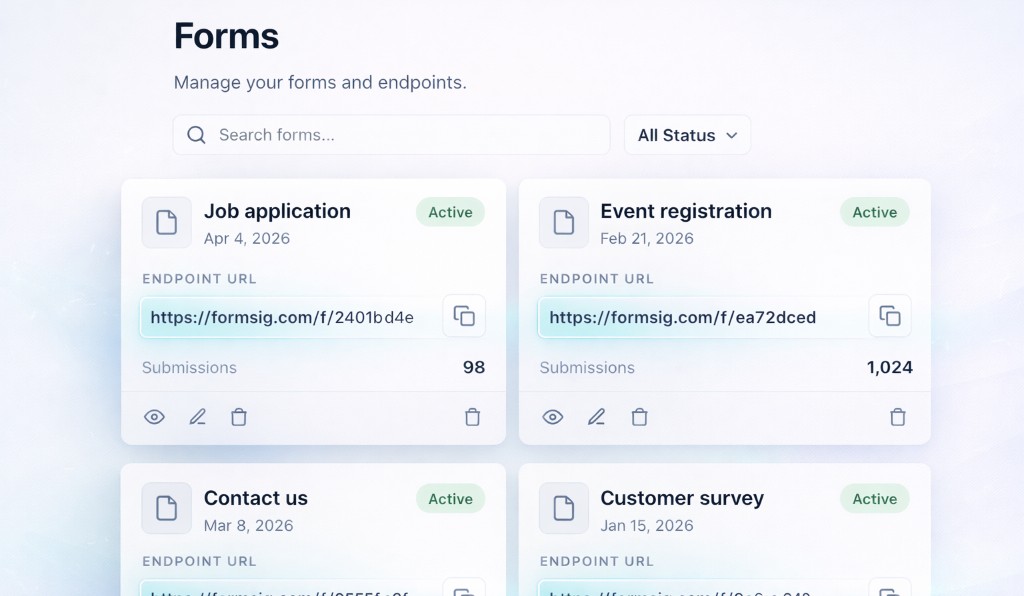
You build the frontend. Formsig handles the backend workflow.

Start freeBrowse guides

What you get

Forms + Pages + AI Chat + dashboard

Not separate tools. Shared billing, limits, and notifications. AI Chat is plug-and-play with no SDK. Pages are hosted and conversion-focused, not a full site builder.

Hosted Pages

Publish at /p/your-slug with templates, branding, and live preview.

  • mobile-friendly layouts
  • fast publishing, no site builder
  • lead capture, inquiries, hiring, events

Share a link and collect submissions without hosting a full website.

Form endpoints

Each form gets a stable /f/{id} POST URL on formsig.com.

  • POST JSON or form data directly (no HTML form required)
  • HTML forms, fetch, React / Next.js, any stack
  • Any field names your app sends

No custom backend required.

AI Chat (Beta)

Plug-and-play chat widget: one script, answers from your crawl and custom knowledge.

  • site crawl and custom snippets
  • email leads in AI Chat → Leads
  • embed on any allowed domain

Getting started guide

Shared inbox

Every submission lands in one dashboard, no matter where it came from.

  • your site or app
  • Hosted Pages
  • direct POSTs and webhooks

Review messages, uploads, history, and activity in one place.

CSV export

Export submissions to CSV on Starter+ plans.

Free plans stay lightweight with in-app access and upgrade paths.

Email notifications

Instant alerts, verified recipients, and digest-friendly options depending on plan limits.

File uploads

Support resumes, attachments, screenshots, and documents using multipart uploads.

Webhooks

POST structured JSON to APIs, Slack, Zapier, Make, Sheets, CRMs, and internal tools.

Optional request signing supported.

Playground

Test forms and requests instantly before production.

  • developers
  • QA
  • agencies
  • client testing

Sanity-check payloads before you ship.

Limits & Turnstile

Clear usage limits and optional Turnstile spam protection before submissions reach your inbox.

How it works

Create → Collect → Manage

Hosted Pages and form endpoints are not separate systems. They use the same submission pipeline.

1

Create

Build a form endpoint, publish a Hosted Page, or create an AI Chat assistant.

2

Collect

Receive submissions, chat replies, email leads, uploads, and webhook events.

3

Manage

Review submissions, export data, update pages and forms, and route workflows without managing servers or backend infrastructure.